
You can use your Business Central data as part of a workflow in Microsoft Power Automate by creating your flows and connecting your data with the Business Central connector.
Once the admin has connected Business Central with Power Automate, you’ll see any flows your organization has added when you choose the Automate action in the relevant pages. You run the flows without leaving Business Central.
These automated workflows open in a pane inside Business Central online so that you remain within the context of the business process you were in the middle of. On some pages, the Automate action hides under the More Options menu, but find it, choose the Power Automate menu item, and then choose the relevant link to trigger the workflow. The connection to Power Automate is already set up for you.
How to create Workflows in Power Automate
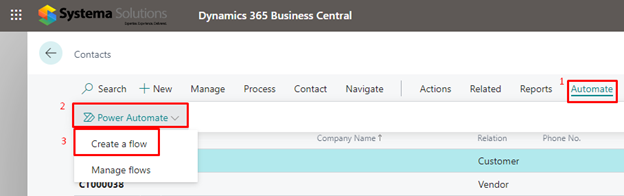
From inside Business Central, choose the Automate action, and then choose the Create a flow action. In Power Automate, you’re automatically signed in, and the Business Central connector shows as the For a selected record (V3) trigger.
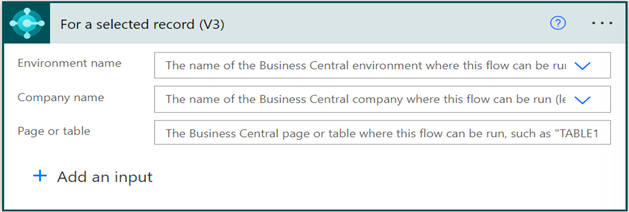
You can limit the flow to a specific environment or company but leave the Environment name and Company name fields blank to make the flow available in all environments or companies. The Page or table field specifies where you want to make the flow available from inside Business Central. For example, to add the new flow to the Automate menu on the Contact Card page in the DEV environment, set the Page or table field to TABLE5050 or PAGE5052.
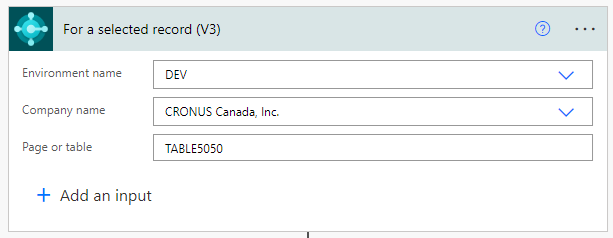
2. Add the relevant steps then click Save.
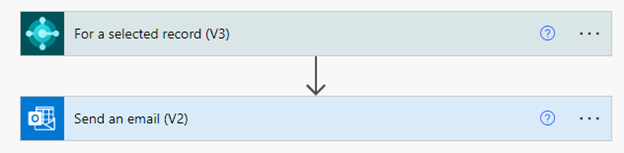
3. The Power Automate flow is now visible under the Automate action in the Contact List Page.
Source: Microsoft
See Business Central’s latest features in action.
Would you like to learn more about the latest about Dynamics 365 Business Central through a live demo? Comment below to let us know or book your personalized demo here.
