Check documents and journals in while you work in Dynamics 365 Business Central
Angelo Gaspar
Share This Post
Microsoft has implemented a new feature that validates the data you enter on documents and journals while you work. It will notify you and assist you in identifying problems with your documents and journals. These visual indicators will help you increase productivity and save time. It’s a must-feature in our Top 10 features of the Business Central 2022 Wave 1 update.
Business Value: To alert you about issues with data in documents and journals that can prevent you from posting, we’ve introduced validations that identify issues right away. Early, unobtrusive visual indications of a problem can help improve productivity and save time.
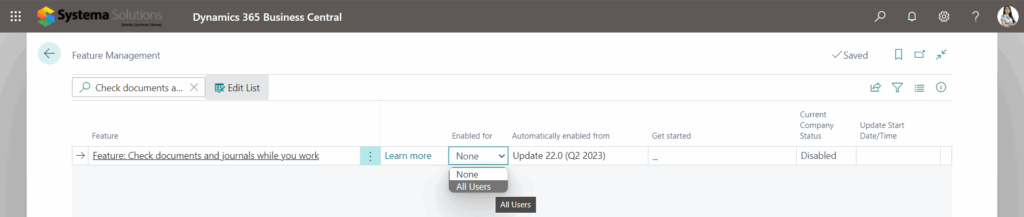
Enables Feature: Check documents and journals while you work on the Feature Management page.
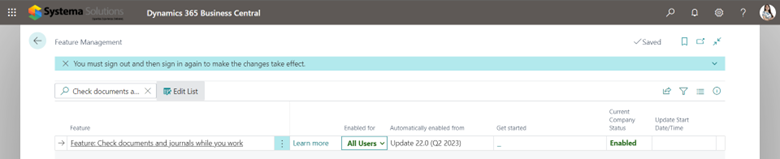
Enable to All User.
Once Enabled, you must sign out and sign in again.
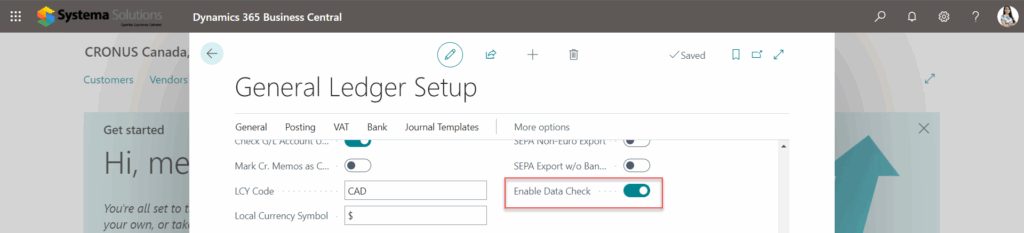
Search for General Ledger Setup.
On the General Ledger Setup page, Enable the Data Check field and turn on the button to enable it.
This configuration will take effect when you work on your documents. Because you enabled the Check Documents feature in the General Ledger Setup, a notification will appear on the page. Click Enable this for me.
When you select Enable this for me in the message, the Document Check FactBox appears, and Business Central begins checking the document for errors as you type.
The Document Check FactBox may be found on the right side, with the Total Issues tile displaying the total number of issues discovered by Business Central.
You can select the tile to open an overview of the problems, which will assist you in resolving them.
See Business Central’s latest features in action.
We hope you find this new feature useful and interesting. Would you like to see other cool features available in Dynamics 365 Business Central’s latest release? Comment below or book your personalized demo here.
DISCOVER HOW TO MAXIMIZE THE VALUE OF YOUR DATA Not finding the information you need from your current reporting environment? Still relying on time-consuming manual reporting and report consolidation
We answered the common questions that we get from clients about Microsoft Power Apps in this blog. For more information about Microsoft Power Apps or Power Platform, please visit this